Overview
The Shadows group of attributes controls two distinct aspects:
- Specifies what objects are casting shadows, wether these shadows are created using shadow maps or ray tracing.
- Specifies if the render engine should do a pre-pass to generate shadow maps that may be needed for rendering the main image (or layers of images).

The Shadows group
Shadow Linking
Specifies the method to determine the objects that are shadowed by lights. It affects all types of shadows: depth map, deep maps and ray traced. The available options are:
| Option | Description |
|---|---|
| Use Light Links | Objects will cast shadows from the lights that are considered illuminating the objects by the light linker. This is the default. |
| Use Shadow Links _______________________ | Objects will cast shadows from the lights that are considered shadowing the objects by the light linker. This allows distinct object-light relations for illumination and shadowing. |
| Ignore Light & Shadow Links | All visible objects will cast shadows from all lights. |
| Info |
|---|
| It is possible to override its value on a per-light basis by using the Shadow Objects attribute of an assigned light attributes node. In this case, sets must be used to specify which objects are shadowed by the light. See Shadow Objects. |
Auto-Generate Shadow MapsAnchor autogenerateshadowmaps autogenerateshadowmaps
Controls wether shadow maps should be automatically generated or not. The default value is on.
Opacity Threshold
Before rendering the main image, the render pass will render all needed shadow maps. This panel controls whether to render shadow maps or not and list details about what shaders to use in a shadow render.
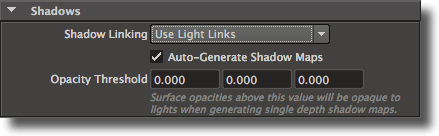
Figure 3.50: The Shadow Maps panel
‘Render Shadow Maps’
This attribute controls wether the shadow maps will be rendered or not. Its default value is on.
‘Use Displacement Shaders in Shadows’
This attribute controls if the displacement shaders are used in the shadow maps ren- dering. By default this toggle is on. Note that turning this toggle off might speed up shadow map rendering but produce incorrect shadows depending on how much the geometry is displaced.
‘Use Surface Shaders in Shadows’
This attribute controls if the surface shaders are used in the shadow maps rendering. By default this toggle is off. It is recommended to turn on this attribute only if some surface shaders are displacing the geometry or modifying the opacity.
‘Use Atmosphere Shaders In Shadows’
This attribute controls if the atmosphere shaders are used in the shadow maps ren- dering, and it is off by default. It is recommended to turn this option on only if deep shadow maps are rendered.
‘Use Interior Shaders In Shadows’
This attribute controls if the atmosphere shaders are used in the shadow maps ren- dering, and it is off by default. It is recommended to turn this option on only if deep shadow maps are rendered.
‘Z Threshold’
ZOnly objects with opacities greater than or equal to the
‘Opacity Threshold
’ willwill appear in shadow maps. The default value is [
10.0,
10.0,
10.0], which means that
only completely opaque objects are rendered into shadow maps. Ifall objects will be included in the shadow map, even completely transparent ones. If this value is set to [
01.0,
01.0,
01.0]
allChapter 3: The User Interface 63
, only completely opaque objects will be
...
rendered into shadow maps. Note that this parameter is only useful for depth shadow maps as deep shadow maps correctly handle semi-opaque surfaces. For users familiar with the RenderMan standard, this is the equivalent of the following RiOption:
...
Option
...
"limits"
...
"zthreshold"
...
[r
...
g
...
b]
...
‘Depth Filter’
This attribute offers the same control as the light attributes node’s "depth filter" attribute. Note that setting the render pass’ depth filter attribute will have no effect on any shadow maps except when a shadow map is produced by one of the render pass’ display. In other words, if a render pass has no primary nor secondary display that use the ‘shadowmap’ display driver, no shadow maps will be affected by this attribute. The available values are:
‘min’ This is the default value.
‘max’
‘average’
‘midpoint’ This value is a little slower to compute but is usually very good at getting rid of the self-shadowing problems.
‘Volume Interpretation’
This attribute will affect only deep shadow maps rendered in one of the displays of the render pass node. Deep shadow maps defined in light attributes nodes will not be affected by this parameter. The available values are:
‘Discrete’ This value should be used to compute shadows cast by solid objects.
‘Continuous’
This value should be preferred for computing shadows cast by participat- ing media (fog, clouds, smoke, etc.)
‘Distance Inside’
‘Shadow Linking’
This attribute controls what type of light linking will be used to determine the list of objects shadowed by a given light. The available values are:
‘Use Light Links’
Objects will cast shadows from the lights that are considered illuminating the objects by the light linker. This is the default.
‘Use Shadow Links’
Objects will cast shadows from the lights that are considered shadowing the objects by the light linker, allowing object-light relations for illumia- tion distinct from those for shadowing.
‘Ignore Light & Shadow Links’
All visible objects will cast shadows from all lights.
...