...
An important paradigm in 3delight for Maya is the Render Pass. Simply put, a Render Pass is a rendering context that encapsulates a list of rendering options and a list (or set) of objects to be rendered. All 3Delight for Maya does is encapsulated all the these options (i.e. all the Rendering Attributes presented in the listed in the The Render Settings window) inside a Render Pass nodes node. It is then possible to create many such nodes and select specify and edit the one we want to use for rendering. A single Maya scene can contain any number of such passes. Each one is rendered independently with possibly very different outputs.
...
- Have multiple rendering quality levels. It is usual to have a Render Pass with settings for a draft render and another one for high quality rendersrender.
- Split rendering of different objects in the scene (such as foreground and background objects) in different passes. In this case, a Render Pass is equivalent to the rendering of a layer which might be composited in a compositing software later in the pipeline.
- Have a one or more passes setup to generate some texture maps (or shadow maps) and another pass to use these maps in for the final image.
The Render Settings window present a menu to select which Render Pass to view and edit is active. All the rendering attributes for the selected active Render Pass are displayed right below (grouped by categories), just like they are in the Attribute Editor.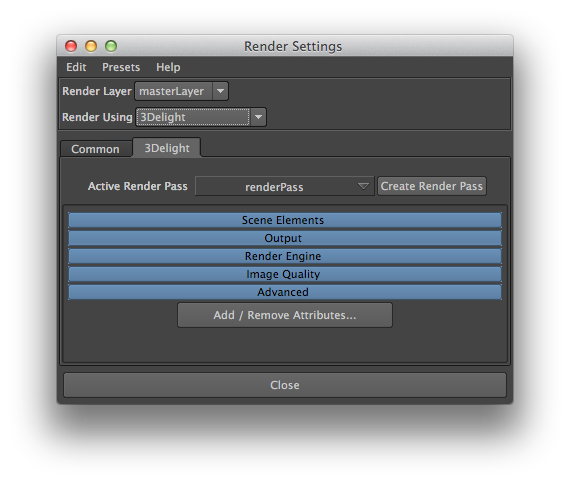
Render Settings window
Here The set of tools to manage Render Passes is explained in details in Managing Render Passes. Here is a description of the two items in the Render Settings window for selecting and creating a Render Pass:
Current Active Render Pass
This option menu lists all Render Pass nodes Render Passes currently in the scene. The selected Select one to make it active and display all its attributes right below. The active one is used for all renderings launched using Render Current Frame or Batch Render options of Maya’s Render menu. By when launching renderings using the various menu items and shelf buttons. It is also the one used when rendering using Maya's Render command line (see Batch Rendering). By default there is only one Render Pass and it is named 'renderPass1renderPass'.
Add Create Render Pass
The Add The Create Render Pass button creates a new Render Pass node and and sets it as the one selected for the Current Active Render Pass attribute.