The cloud tab in 3Delight Display is a general monitoring tool of your ongoing cloud renderings. It monitors not only the rendering as it happen in 3Delight Display's image view, but any cloud rendering happening under your account – such as renderings launched using the command lines and renderings launched using other applications or on another computer at another location.
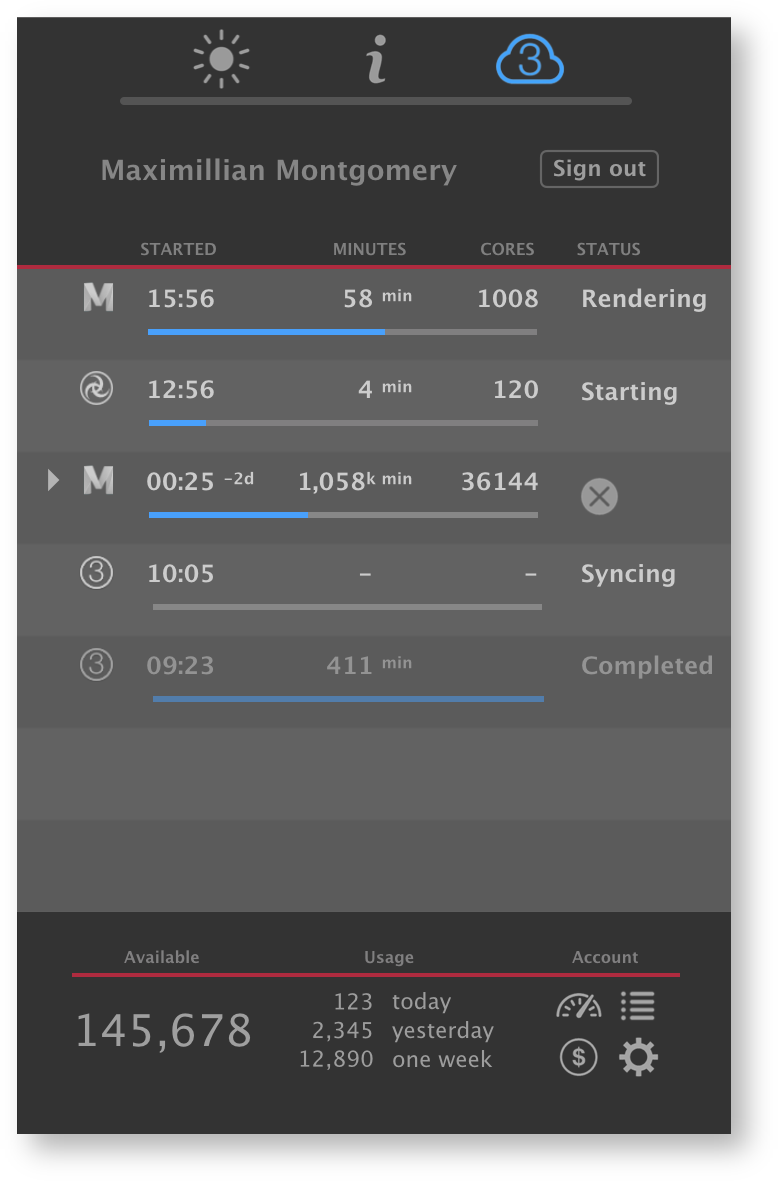
Cloud activity tab in 3Delight Display
Activity Details
| Indicates the rendering of a sequence of images. Clicking on the arrow will expand it to list all images within the sequence that are at some stages of the rendering process. |
|---|---|
| Identifies the application that was used to lunch the rendering. Currently there are: Maya, Render (Maya Batch), Katana, Katana Batch, renderdl (3Delight's command line). Shown here is the icon for renderdl. | |
STARTED | Time at which the rendering process was started. |
MINUTES | The number of cloud minutes spent so far on the rendering. This is counted as a quantity of 24-core-minutes usage, not user time. For the first 3 minutes, the quantity is displayed in seconds. Note: Minutes are not counted, nor charged, during syncing. |
CORES | The number of cores used for rendering. This will vary over time. |
STATUS | Indicates the status of the process — such as Syncing, Starting, Rendering, Completed, Waiting, Aborted, etc. The list of reported statuses is described in detail here. |
| This icon will be shown while hovering a rendering process on the list. Click to cancel that rendering process. |



* When a rendering process is finished (successfully or not), it remains in the list in a subdued shade for one hour.
Account Information
At the bottom of the Cloud tab, a summary of the user's account information is presented.
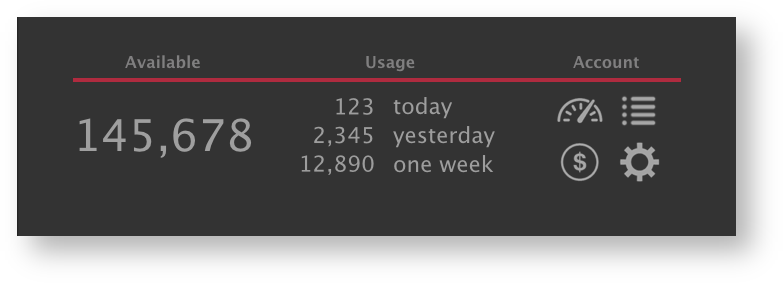
Description:
Available | Shows the minutes credits available in the account. |
|---|---|
Usage | Shows recent usage in minutes. Today is from midnight until now. Yesterday is the full 24 hours of the previous day. One week is the previous 7 x 24 hours from now*. * This one week usage differs from the "1 week" cumulative usage presented online in the user account overview. In the later, it does not include today's usage, but the previous 7 integral days. |
Account | Four convenience links to the user's online account at the following pages: Account Overview, Detailed Transactions (payments and renders), Purchase Credits, Account Settings. |