Overview 概要
3delight for Mayaで最も重要なのはRender Passです。Render Passは様々なレンダリングするためのオプションやレンダリングするオブジェクトリスト(あるいはセット)が内包されています。
全ての3Delight for Mayaではこれら全てのオプション(各リストはThe Render Settingsを参照)がRender Passノード内に纏めてあります。
Passには様々なノードを追加でき、編集も可能です。1つのMayaシーンでPassは何個でも作成できます。それぞれのPassで異なった出力を設定して独立したレンダリングをすることができます。
必ずしも複数のRender Passes(最もシンプルなのは1つのPass)を設定する必要はないが、Passを増やす事でプロダクションにおけるパイプラインに乗ったレンダリングをよりフレキシブルに行う事ができます。例えば以下のように使用できます。
- 複数のクオリティレベルをもったレンダリング。この場合、Render Passは確認用とハイレゾ用とに分けます。
- シーン内のオブジェクトを分けてレンダリング(例、背景と前景など)。この場合ではRender Passは合成用のレイヤーとして分けてレンダリングします。
- テクスチャ(あるいはシャドウ)用のパスとそのマップを使用した最終用のPassなど
Render SettingsではどのRender Passをレンダリングするか指定する場所があります。Render Passの全てのレンダリングアトリビュートは以下に表示され(カテゴリごとにグループ分けされています)、アトリビュートエディタのように使う事ができます。
An important paradigm in 3delight for Maya is the Render Pass. Simply put, a Render Pass is a rendering context that encapsulates a list of rendering options and a list (or set) of objects to be rendered. All 3Delight for Maya does is encapsulated all the these options (listed in the The Render Settings window) inside a Render Pass node. It is then possible to create many such nodes and specify and edit the one we want to use for rendering. A single Maya scene can contain any number of such passes. Each one is rendered independently with possibly very different outputs.
Although it is not necessary to have multiple Render Passes (the simplest rendering setup contains only one pass), having the possibility to use many such passes gives increased flexibility of rendering in the production pipeline. As an example, rendering passes could be used to:
- Have multiple rendering quality levels. It is usual to have a Render Pass with settings for a draft render and another one for high quality render.
- Split rendering of different objects in the scene (such as foreground and background objects) in different passes. In this case, a Render Pass is equivalent to the rendering of a layer which might be composited in a compositing software later in the pipeline.
- Have a one or more passes setup to generate some texture maps (or shadow maps) and another pass to use these maps for the final image.
The Render Settings window present a menu to select which Render Pass is active. All the rendering attributes for the active Render Pass are displayed right below (grouped by categories), just like they are in the Attribute Editor.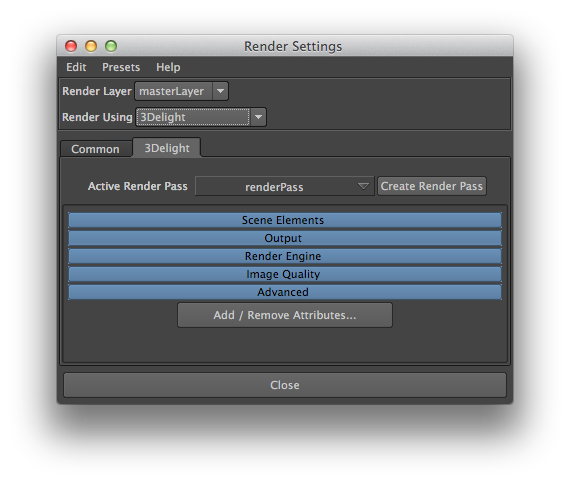
Render Settings window
Render Passes の詳細な使い方に関してはManaging Render Passesを参照して下さい。下記はRender Settings最初にPassを選択した場合や新規でPassを作成する際に表示される項目の内容です。デフォルトでは'renderPass'という名前で
Active Render Pass
メニューにはシーンで作成したRender Passを選ぶ事ができます。レンダリングするPassを選択すると、その下にアトリビュートが表示されます。また、MayaのRenderコマンド(参照:Batch Rendering)でバッチレンダリングする場合はここで指定したPassがレンダリングされます(オプションでPassの変更可)。デフォルトではRender Passが1つ'renderPass'の名前で設定されています。
This menu lists all Render Passes currently in the scene. Select one to make it active and display all its attributes right below. The active one is used when launching renderings using the various menu items and shelf buttons. It is also the one used when rendering using Maya's Render command line (see Batch Rendering). By default there is only one Render Pass and it is named 'renderPass'.
Create Render Pass
新規でRender Pass を作成し、アクティブなPassとして設定します。