Albeit there are many image input file formats that could be fed to the renderer, and many that could be used to output images from the renderer, only few should really be used for performance, efficiency and reliability. This mini article helps you make the proper choice on a type-basis.
| Format | Bits | Type | Has alpha/channels? | Default Color Space | Compression
(bold: suggested) | Suggested use |
|---|
| TGA | 8 → 24 | int | no | sRGB | RLE |  avoid usage (bad compression). Use EXR or TIF instead avoid usage (bad compression). Use EXR or TIF instead |
| TGA | 32 | int | yes | sRGB | RLE | avoid usage (bad compression). Use EXR or TIF instead |
| EXR | 16 | half | yes | linear | ZIP, ZIPS, PIZ |  color, bump/normal/anisotropy, displacement, hdri environment, matte painting, output images (including deep) color, bump/normal/anisotropy, displacement, hdri environment, matte painting, output images (including deep)
|
EXR
| 32 | float | yes | linear | ZIP, ZIPS, PIZ | displacement, hdri environment (use EXR HALF rather than HDR FLOAT when possible), output images (including deep) |
| HDR | 32 | float | no | linear | uncompressed | hdri_environment (use EXR when possible) |
TIF | 8 | int | yes | sRGB | LZW | color, bump/normal/anisotropy, matte paintings (use EXR when possible)
|
| TIF | 16 | int | yes | sRGB | ZIP | color, bump/normal/anisotropy, matte paintings (use EXR when possible)
|
| TIF | 32 | int | yes | sRGB | ZIP | avoid usage (file size too big: use EXR instead) |
| TIF | 32 | float | yes | linear | ZIP | avoid usage (file size too big: use EXR instead) |
| PNG | 8 | int | yes | sRGB | LZW | color, bump/normal/anisotropy (use EXR when possible)
|
| PNG | 16 | int | yes | sRGB | LZW | avoid usage (use EXR instead) |
| JPG | 8 | int | no | sRGB | DCT | avoid usage (compression artifacts) |
| PSD | 8 → 16 | int | yes | sRGB | Adobe | avoid usage (proprietary, layer evaluation cost) |
| PSD | 32 | float | yes | linear | Adobe | avoid usage (proprietary, layer evaluation costs, float data out of PhotoShop should never be trusted) |
Important Notes
integer textures are always sRGB. TIF and PNG texture painted/created in Photoshop are typically integer sRGB images.float and half textures are always linear. They are typically created in packages which can handle linear/float data such as Krita and Nuke.- For a proper linear workflow, color textures must always be linearized before rendering, see:
- "Non-color" data, such as float displacement maps, vector displacement maps, bump maps, normal maps, anisotropy maps should always be tagged as linear. Note that 3delight for Maya automatically interprets displacement maps as linear data when color management is active, however bump maps, normal maps, anisotropy maps, environment maps are not, and should be manually tagged as linear.
tga (targa) files should never be used because they offer bad compression (RLE). Use tif with LZW compression instead of TGAs.- 16 and 32 bit images are larger than 8 bit images, and should be used only when higher precision is actually really necessary.
jpg textures always have compression artifacts due to DCT compression and should be absolutely never used as input textures.psd textures should not be used in Maya (nor in Nuke) due to the additional cost in reading through multiple layers. Instead of using psd save out layers separately as tif files (with LZW compression).- Outputting multi-layer exr files from the renderer is possible, simply use the same file name in Default Image Fle Name of the render pass, for instance:
3delight/<scene>/image/<scene>_<pass>_#.<ext>
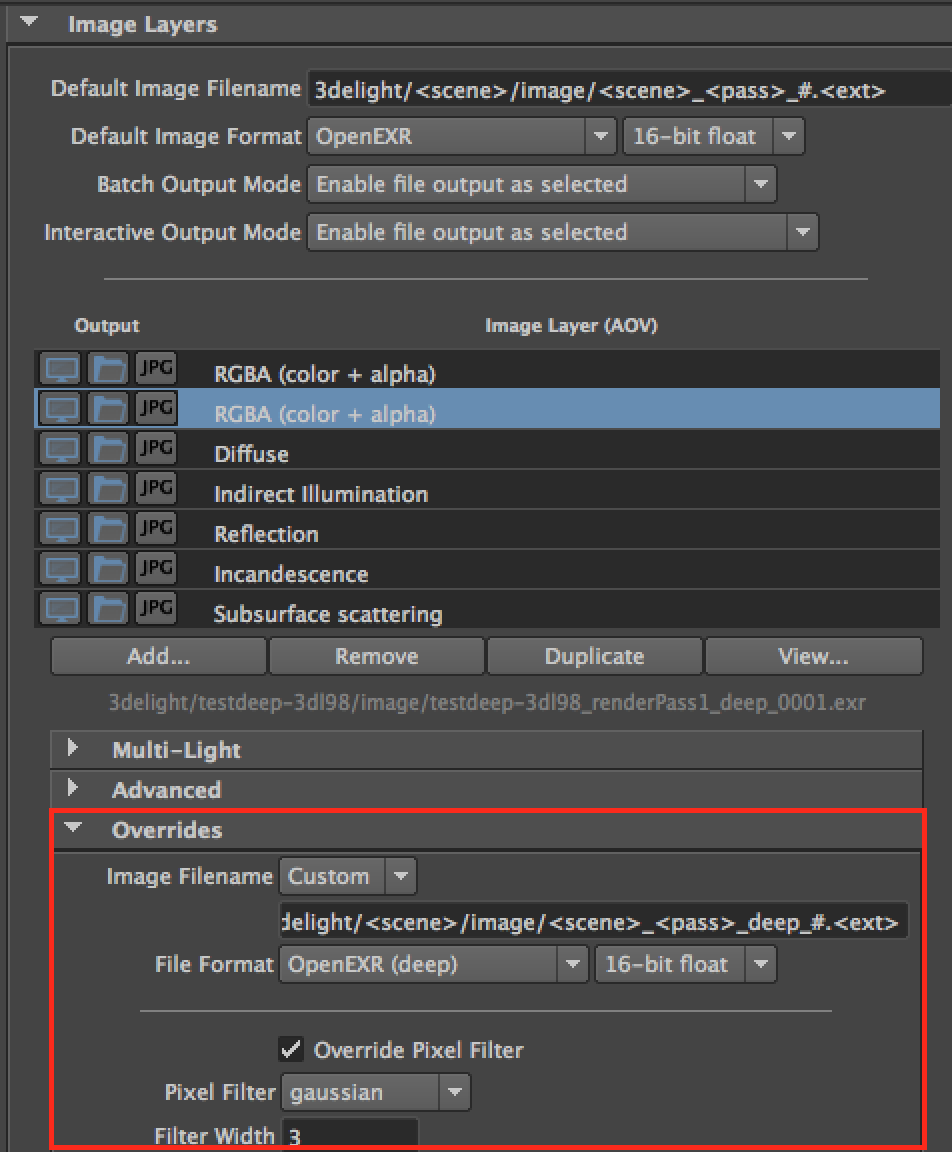
- Outputting multi-part exr files (a mix of deep and non-deep image layers) into a single file is currently not supported, for the time being please output deep exr image files separately from non-deep multi-layer exr image files. This can be done easily in the render pass by duplicating the RGBA image layer and set an override to deepexr: